

SHARE



Best Restaurant Website Design Guide2026
March 6, 2026 | 4 min read
By WePage Team
Table of Content
customers to online ordering. Build a professional site with WePage.
A well designed restaurant website plays a critical role in making ordering feel simple and intuitive, even when the actual ordering process is handled through external platforms. Your website should act as a clear guide that helps customers understand what to do next without confusion or hesitation. When visitors arrive, they should be able to view your menu easily, understand how orders are placed and quickly identify whether ordering is available for pickup, delivery or phone orders. Clear explanations, visible links to external ordering platforms where relevant and easy to find phone ordering details all help remove friction. Calls to action should be placed near menus and featured prominently on the homepage so customers are never left guessing how to order.
1. Building a Clear and Effective Online Menu
An effective online menu helps customers make decisions quickly and confidently. Menus should be organized in a logical way so visitors can find items without scrolling excessively or searching through cluttered pages. Grouping dishes into familiar categories such as starters, mains, sides and drinks makes navigation easier and mirrors how customers naturally think about ordering.
Avoid overcrowding menu pages with too many items. A clean, focused presentation improves readability and reduces decision fatigue. Menu descriptions should clearly explain key ingredients and preparation style without becoming overly long. Transparent pricing is equally important, as it builds trust and helps prevent confusion or disputes during the ordering process. When customers understand what they are ordering and what it costs,
they are more likely to complete the order.
2. Using Images to Support Ordering Decisions
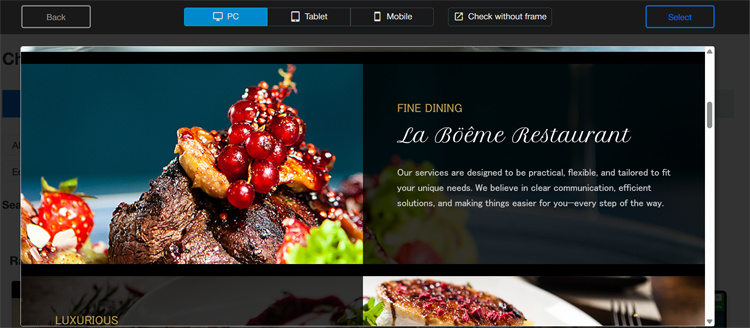
High quality food photography plays an important role in helping customers feel confident placing an order. Images give customers a visual reference and help set expectations before they commit. Photos should accurately reflect how dishes are actually served. Over styled or misleading images can lead to disappointment and damage trust.

Consistency matters when using images across your menu. Using similar lighting, backgrounds and framing helps your menu feel cohesive and professional. A consistent visual style reinforces your brand and makes the browsing experience more enjoyable.
3. Optimizing the Ordering Experience
Even when orders are placed through external platforms, your website still influences whether customers follow through. A smooth ordering experience starts with clarity. Calls to action should be easy to spot near menu sections and ordering instructions should be written in simple, straightforward language.
Mobile friendly layouts are essential, as many customers browse restaurant websites on their phones. Business hours should be clearly displayed and kept up to date so customers know when ordering is available. Menus and ordering links should always reflect your current offerings. Testing ordering links regularly ensures customers can complete the process without errors or dead ends.
4. Marketing Your Restaurant Website
Your website supports all of your marketing activity and should act as the central source of truth for your business. No matter where customers first discover your restaurant, your website should be where they return for accurate and up to date information.
Traffic can be driven to your website by linking it from delivery apps, adding your website URL to receipts and printed menus, sharing menu updates on social media and including your website in email communications. Consistent promotion helps reinforce your brand and ensures customers know where to find the most reliable information.
5. Common Mistakes to Avoid
Several common issues can reduce the effectiveness of a restaurant website. Hiding ordering instructions makes it harder for customers to take action. Outdated menus and broken ordering links create frustration and lead to lost orders. Unclear service hours and inconsistent pricing information can also damage trust.
Clear, accurate and consistently updated information helps prevent customer frustration and supports a smoother ordering experience overall.
6. Getting Started with WePage
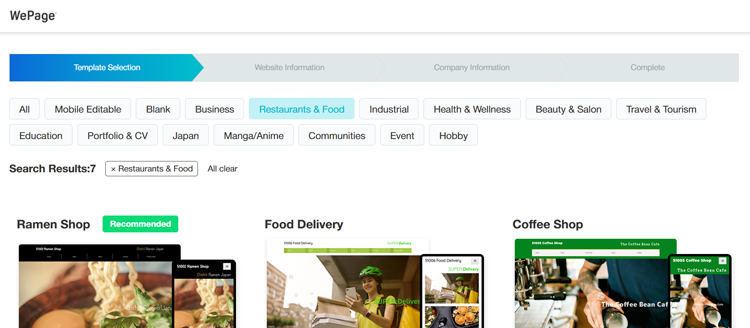
WePage is an online website builder that allows restaurants to create professional websites using ready-made templates. It does not provide online ordering, payment processing or plugin integrations. Instead, it focuses on helping restaurants present menus, branding and ordering information clearly and professionally.
With free and premium plans available, WePage makes it easy to build a restaurant website that guides customers to external ordering platforms or preferred contact methods, without technical complexity.
 Getting Started with WePage
7. Frequently Asked Questions
7-1. Does WePage include online ordering?
No. Online ordering is handled through third party platforms. WePage is used to build the restaurant website that presents ordering information clearly.
7-2. Can I link to delivery platforms from my website?
Yes. Your website can guide customers to external ordering services using clear links and calls to action.
7-3. Do I still need a website if I use delivery apps?
Yes. Your website builds trust, strengthens your brand and provides a central, accurate source of information that delivery apps cannot replace.
SHARE
Related articles


