

SHARE



What is a URL? A Beginner's Guide to Choosing Your Web Address
March 25, 2026 | 8 min read
By WePage Team

Table of Content
- What Exactly is a URL?
- URL vs Domain vs Website Address
- What URLs Do in Real Life
- Deconstructing a URL: The Main Parts
- How to Choose the Perfect Domain Name
- Crucial Mistakes to Avoid When Buying a Domain
- URLs and SEO: Best Practices and Warnings
- Step-by-Step: Getting Your Domain Up and Running
- Conclusion
You see and use URLs every day. You type them into your browser. You click them in emails. You share them in text messages. But most people never stop to ask what those letters actually mean or why they matter.
Then you decide to build your first website.
Suddenly you are staring at words like domain, protocol, extension, DNS, SSL. It can feel like choosing a simple web address has turned into a technical project.
It does not have to be that way.
This guide explains URLs in plain words. You will learn what a URL really is, how its parts work together, how to choose a strong domain name for your brand, and why it matters for security and search engines. By the end, you will be able to look at any web address and understand exactly what you are seeing.
1. What Exactly is a URL?
1-1. The Simple Definition
URL stands for Uniform Resource Locator.
That sounds formal, but the meaning is simple. A URL is the address that points to a specific place on the internet
That place might be:
- A homepage
- A blog post
- A product page
- A PDF file
- An image
- A video
To deliver mail correctly to a house, you need the right address. If only one digit of the number is incorrect, then mail goes to a different place.
A URL functions on the same principle; it gives your web browser exact instructions as to where it should visit.
For example:https://chicagobakery.com/menu
That URL directs your browser to a specific page on that website. If you remove part of it or change a letter, you may end up somewhere completely different.
2. URL vs Domain vs Website Address
These terms get mixed up all the time. That is normal.
Here is the simple breakdown:
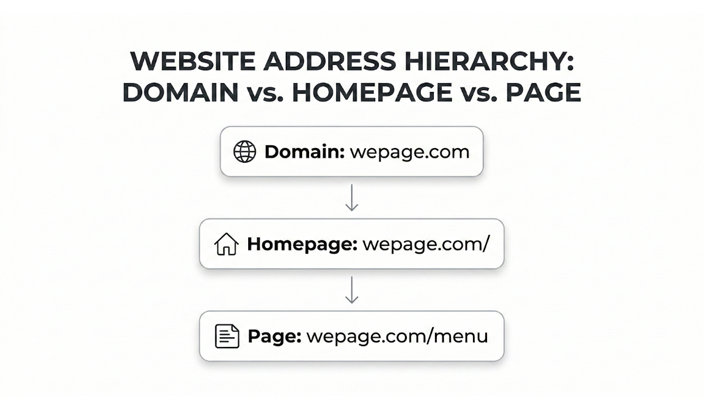
- URL can point to any page or file online.
- Domain is the core name, like chicagobakery.com.
- Website address usually refers to the homepage URL, like https://chicagobakery.com/.
So every homepage address is a URL. But not every URL is a homepage.
For example:
https://chicagobakery.com/ → Homepage
https://chicagobakery.com/menu → Specific page
https://chicagobakery.com/menu/cakes.pdf → File
People use these words interchangeably in conversation. What matters is that you understand the structure behind them.
3. What URLs Do in Real Life
URLs make the internet shareable.
If one comes across a very informative article, then they can copy the URL and share it with a friend. If a person wants to save information for later use, they have an option of bookmarking the URL. If you want to promote your business, you print your domain on business cards.
Search engines also rely on URLs. Before Google even reads your page content, it looks at the URL for clues. A clean address like:
/piano-lessons/
tells search engines far more than:
/page?id=45
A good URL improves clarity for both humans and machines.
4. Deconstructing a URL: The Main Parts
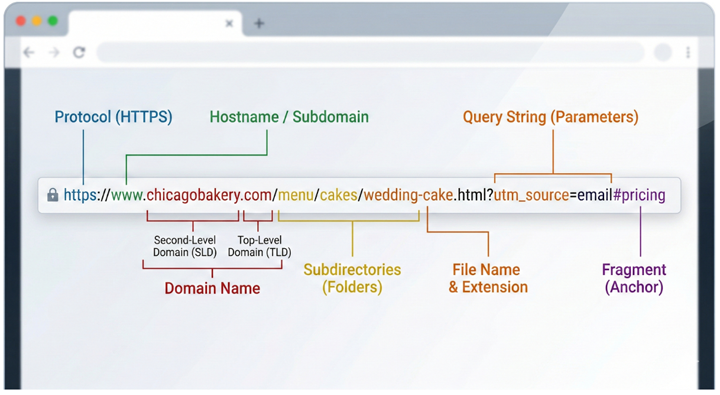
Let's use one example throughout this section:
https://www.chicagobakery.com/menu/cakes.html
This single line contains several parts working together.
4-1. Protocol (HTTP vs HTTPS)
The first part is:
https://
This is the protocol. Think of it as the rules of communication between your browser and the website server.
You will usually see:
- http
- https
The difference is security.
- HTTP sends data without encryption.
- HTTPS encrypts the data before sending it.
That encryption protects information such as contact forms, passwords, and payment details. Modern browsers even show warnings on sites that still use HTTP.
Today, almost all professional websites use HTTPS by default. It builds trust and protects users.
4-2. Subdomain and Hostname
Next in our example:
www
This is a common subdomain. It historically stood for "World Wide Web."
Some websites keep it. Others drop it entirely. Both are fine as long as they are set up correctly.
Subdomains can also be used for sections of a site, such as:
shop.yoursite.com
blog.yoursite.com
You can think of subdomains as separate departments inside the same company.
4-3. Domain Name
This is the core identity:
chicagobakery.com
The domain is unique. No two businesses can own the exact same domain at the same time.
Domains end with what is called a Top-Level Domain (TLD), such as:
- .com — most common in the US
- .org — nonprofits
- .us — US-focused identity
- .net — general use
The part before the dot is your brand name. Together, they form your online identity.
4-4. Subdirectories (Folders)
Now look at:
/menu/
This is a subdirectory. It works like a folder on your computer. Inside the "menu" folder might be pages for cakes, bread, or catering.
Subdirectories organize content logically. They help users understand where they are and help search engines understand your site structure.
4-5. File Name and Extension
Finally:
Cakes.html
This is the file name. The .html is called an extension. It tells the browser what type of file it is.
Common examples:
- .html — web page
- .pdf — document
- .jpg or .png — images
Many modern website builders hide file extensions to keep URLs cleaner, but the structure still exists behind the scenes.
4-6. Bonus Parts You'll See Often
You may also see:
A question mark (?)
Example: ?utm_source=email
This is called a query string. It passes extra information, often used for tracking marketing campaigns or filtering search results.
A hash symbol (#)
Example: #pricing
This is called a fragment. It sends the user to a specific section on a page.
These parts are common. You do not need to memorize them. You just need to recognize what they are.
5. How to Choose the Perfect Domain Name
Your domain is your digital storefront sign. It is the first thing a potential customer sees, and a strong one makes it easier for people to find you, trust you, and remember you. Selecting a correct domain name is very important and is an essential branding element for your company which could stick with it over the coming years.
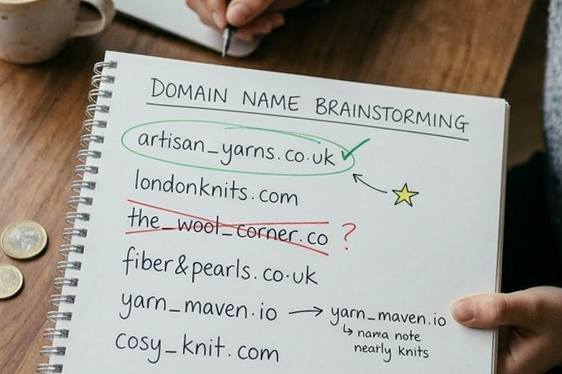
5-1. Keep It Short, Simple, and Pronounceable
Shorter domains are easier to remember. Aim for 20 characters or less if possible. Avoid long strings of numbers or complicated spellings.
Use the "radio test." If you say your domain out loud on a podcast, will someone know how to type it correctly?
Clear and simple always wins.
5-2. Make It Reflect Your Brand
Your domain should signal what your business does. For US small businesses, pairing your city or service with your name works incredibly well. Names like these are instantly recognizable and tell visitors exactly what to expect:
- chicagobakery.com
- denverplumbingservices.com
- oakstreetlawfirm.com
- bostonplumbing.us
A name like cb-123.com does not communicate meaning. It feels generic and forgettable.
5-3. Choose a Trusted Top-Level Domain
In the US, .com is still the most recognized and trusted extension. .org works well for nonprofits. .us works for US-based identity. Some uncommon endings can look suspicious to first-time visitors. If your goal is trust and clarity, stick with widely recognized extensions.
6. Crucial Mistakes to Avoid When Buying a Domain
6-1. The Shared Domain Trap
A shared domain looks like this:
yourname.freewebsite.com
A custom domain looks like this:
yourname.com
Shared domains are fine for testing ideas. But for a real business, a custom domain looks more professional and builds trust.
6-2. Spelling Errors and Typos
Once you buy a domain, you cannot simply edit it. If you make a spelling mistake, you usually need to buy a new one.
Before purchasing:
- Double-check spelling.
- Check capitalization.
- Ask someone else to review it.
6-3. Trademark and Legal Considerations
Avoid using names that are too close to existing brands. In the US, you can check trademarks using the USPTO database. A quick search can prevent serious legal trouble later.
6-4. Understanding Renewal Fees
Domains are rented yearly, not purchased forever. A standard .com typically costs around $10 to $20 per year. Prices vary depending on provider and demand. Turn on auto-renew so your domain does not expire unexpectedly.
7. URLs and SEO: Best Practices and Warnings
7-1. Use Clear, Descriptive Slugs
Compare:
/piano-lessons/
vs
/page1/
The first one clearly tells users and search engines what the page is about.
7-2. Keep URLs Short and Structured
Organized folder structures help users navigate. Internal links between related pages strengthen your site's structure and enable search engines to understand your content better.
7-3. What Happens If You Change a URL
Changing a URL after you have published can reduce traffic. Search engines perceive it as a new page, but you can prevent this with setting up a 301 redirect. The 301 redirect is an instruction given by a website to a search engine that the old webpage has permanently been moved to a new location of URL.
Have good plans with regards to your URLs before starting up and prevent any unnecessary changes later.
8. Step-by-Step: Getting Your Domain Up and Running
8-1. Step-by-Step: Getting Your Domain Up and Running
Traditionally, you would:
- Buy a domain from a registrar
- Buy hosting from a provider
- Connect them using DNS settings
- Set up SSL for HTTPS
- Test everything manually
With WePage, getting started is easy:
- Choose a template and build your website
- Upgrade to the Plus plan or above
- Let us know your preferred domain
- We’ll handle the setup for you
WePage is available worldwide and billing is in USD. The goal is to reduce technical friction so you can focus on building your business instead of wrestling with server settings.
9. Conclusion
A URL is your address on the internet.
When one understands its components well then it becomes less frightening. One can choose a domain name that properly reflects on his/her brand identity, use known and trusted extensions, avoid common pitfalls, and structure your pages clearly.
Use HTTPS. Keep your URLs readable. Think before changing them later.
If you are ready to build your site, start with WePage for free. When you are ready for a custom domain, connect it in just a few steps and launch your site with confidence.
SHARE
Related articles


