

SHARE



Best Website Layout for Cosplayers: Show Your Photos & Events
January 9, 2026 | 12 min read
By WePage Team
Table of Content
- Why Cosplayers Should Have Their Own Websites
- Must-Have Elements for Cosplay Photography Sites
- Image-First Layout for Maximum Wow Factor
- Creating Effective Cosplay Photo Galleries
- Creating a Convention Event Calendar
- Social Media Integration That Works
- Commission Information and Contact Setup
- Mobile Optimization for Browsing on the Convention Floor
- Selecting the Best Cosplay Website Builder
- Crafting an About Section That Resonates
- Handling Photographer Credits Properly
- Keeping Your Cosplay Site Updated
- FAQ
- What is the best website builder for cosplay portfolios?
- How many photos should I post per costume?
- Do I need a custom domain for my cosplay website?
- Do I need to have a separate cosplay site from my social media?
- How do I sort costumes of the same character?
- Can I have a cosplay portfolio website to make money?
- Conclusion
You've spent all year breaking out the tools and glue guns, crafting amazing outfits, and suddenly you're left with photos of your work spread across Instagram, Twitter, Facebook, and maybe even TikTok. II ask artists all the time where I can see their work, and they end up pointing me to five different places.
The truth is, you want one place where everything can live, and that means a dedicated cosplay website.
Developing a cosplay portfolio site isn’t about convoluted web design or breaking the bank. It’s about creating a clean, visual portfolio that fans, photographers, and convention promoters can easily browse.
1. Why Cosplayers Should Have Their Own Websites

Day-to-day social media is great, but awful as a permanent portfolio. Instagram posts get buried. Twitter threads disappear.
When someone discovers your work at a convention and likes it enough to want more, you need a permanent place to send them.
Your cosplay website is your professional business card.
When convention organizers search for guests, they look at websites, not just Instagram. Photographers seeking to collaborate search for portfolios that can be easily browsed. Brands interested in sponsorships need to see your entire body of work located in one place.
You own your website. Platforms like Instagram can change their rules, delete your account, or stop showing your posts. Your website stays yours forever. Everything you ever worked on is there, forever, organized exactly the way you'd arrange it.
Thanks to builders like WePage, in a few hours (and without touching code or spending hundreds of dollars!) you can have a professional cosplay site up and running.
2. Must-Have Elements for Cosplay Photography Sites
The cosplay website builder you choose is important, but what you include is more important still:
- ★ Your best work as a hero section. Your homepage should wow visitors with your best costume photo right at the top.
- ★ Character and series photo galleries. You don’t want to dump 500 photos into a single gallery. Make galleries for the 3 major costumes or characters.
- ★ About section. Tell me about who you are. Your cosplay journey—how long you've been doing this, what you do, what your expertise is. This is a way for people to learn about the person inside the costume.
- ★ Convention schedule or event calendar. Where you will appear, when, and if you are available for photoshoots.
- ★ Commission information if you get it. Do you make props for other people? Be explicit about this with your pricing or a lead-gen form for estimates.
- ★ Social media links are prominently displayed. Your website is your hub, but social is where the daily give and take takes place.
- ★ Contact form or email. For partnership requests, interview requests, and commission inquiries.
You don't need twenty pages. These basic ingredients need to be good.
3. Image-First Layout for Maximum Wow Factor
Cosplay is visual. Your website design should bring photos to the forefront:
Large, high-quality photos everywhere. Don't use tiny thumbnail images. Show your work big and bold.
Grid layouts for galleries. A tidy grid reveals various costumes at once, helping your guests scroll for the perfect costume fast.
Minimal text on image pages. Keep descriptions brief. "Asuka Langley – Neon Genesis Evangelion – Anime Boston 2024" would do.
Dark or neutral backgrounds. Black, dark gray, or muted textures force colorful costume photos to pop.
Slideshow or carousel of several images per costume. There are probably 5-15 good photos of each costume. Use slideshows so people can flip through them easily.
Mobile-optimized image viewing. There will be lots of people visiting your site on phones at conventions.
Fast load times, even with large images. Compress photos appropriately. Most platforms handle this automatically.
The layout should clear the way and let your costume shine.
4. Creating Effective Cosplay Photo Galleries
Your galleries are the heart of your cosplay portfolio site:
- Sort by character or series, not date. Someone looking at your Demon Slayer costumes wants to see them all in one place.
- Include variety in each gallery. Full body poses, prop/armor detail, posed action and casual shots.
- Name galleries clearly. "Tanjiro — Demon Slayer," not "Red and Black Costume."
- Include some basic information in each gallery. Character name, series, convention or shoot location, photographer credits.
- Feature your best shot first. The first picture should be your best photo of that costume.
- Credit photographers always. It's professional, and photographers will notice that, and you'll get more collaborations.
- Keep galleries focused. Each gallery is either one costume or a series of shots that go together.
Good gallery organization is the difference between people spending 2 minutes on your site or 20 minutes looking at your work.
5. Creating a Convention Event Calendar
Conventions are a huge part of cosplay, which is why schedules matter:
List upcoming conventions clearly. Name of the convention, dates, location, and whether you have a confirmed invitation to attend.
Example: "Anime Expo 2024 - July 4-7 - Los Angeles, CA - Confirmed."
Include past conventions, too. This displays your experience and makes you memorable!
Indicate whether you are available for photoshoots. State explicitly if you book appointments or take hallway photos at random.
Name the days for specific costumes! "Wearing Miku on Friday, Zero Suit Samus on Saturday" can let photographers know what to expect when.
Add meetup information. List if you are going to any series-specific meetups.
Update regularly. Few things look worse than an event calendar trapped in 2022.
Simple format works best. Sometimes, a simple list is easier to read—and update—than fancy calendar widgets.
6. Social Media Integration That Works
Your cosplay portfolio website and social media should coordinate like a well-oiled machine:
- Prominent social media icons. Instagram, Twitter, TikTok, Facebook. Put these in your header and/or footer so they appear on every page.
- Embed your Instagram feed. Many website builders will allow you to feature your most recent Instagram posts as part of your site.
- Links to social in photo credits. "Photos by @photographername" with their Instagram attached.
- Promote your website on social. Share with your audience whenever you add new costumes. "Finally added my Anime Boston pics to updated portfolio - link in bio!"
- Consistent branding across platforms. Use the same kind of profile photos, banners, and color schemes everywhere.
- Keep your website easy to remember. yourname.com is better than yourname-cosplay-portfolio-site-123.wepage.com.
Your website is home base. Social media brings people there.
7. Commission Information and Contact Setup
If you make costumes, props, or appearances for commissions, your website requires crystal clear information:
Dedicated commissions page. Elaborate on what you provide, how you approach things, and what your rates are.
Examples of commissioned work. Photos of things you've built for other people.
Clear process explanation. "50% Deposit up front, Weekly In-Progress Pictures, 2-3 months General Turnaround Time."
Contact form specifically for commissions. Fields for:
- What they want
- How much do they plan to spend
- When they need it
- Reference images
Pricing transparency. Giving ranges helps:
- Simple props: $50 to $150
- Full costumes: $300 to $800
- Complex armor: over $800
Let opportunities come to you.
8. Mobile Optimization for Browsing on the Convention Floor
While you are at conventions, cruising around checking your phone, tons and tons of people will find your cosplay site:
- Test on actual phones. Test on genuine phones, both iPhone and Android.
- Image galleries need to work on mobile. Photo browsing should be easy and intuitive.
- Navigation must be simple. Phone users get frustrated by complex drop-down menus.
- Contact buttons should be tap-friendly. Social media icons need to be large enough to touch accurately.
- Load times are even more important on mobile. Convention center wifi is often terrible.
Someone sees your costume at a con, searches on their phone for your name right there, and bam, they're on your site. If it's the least bit clunky on mobile, you've lost a potential follower or commission client.
9. Selecting the Best Cosplay Website Builder
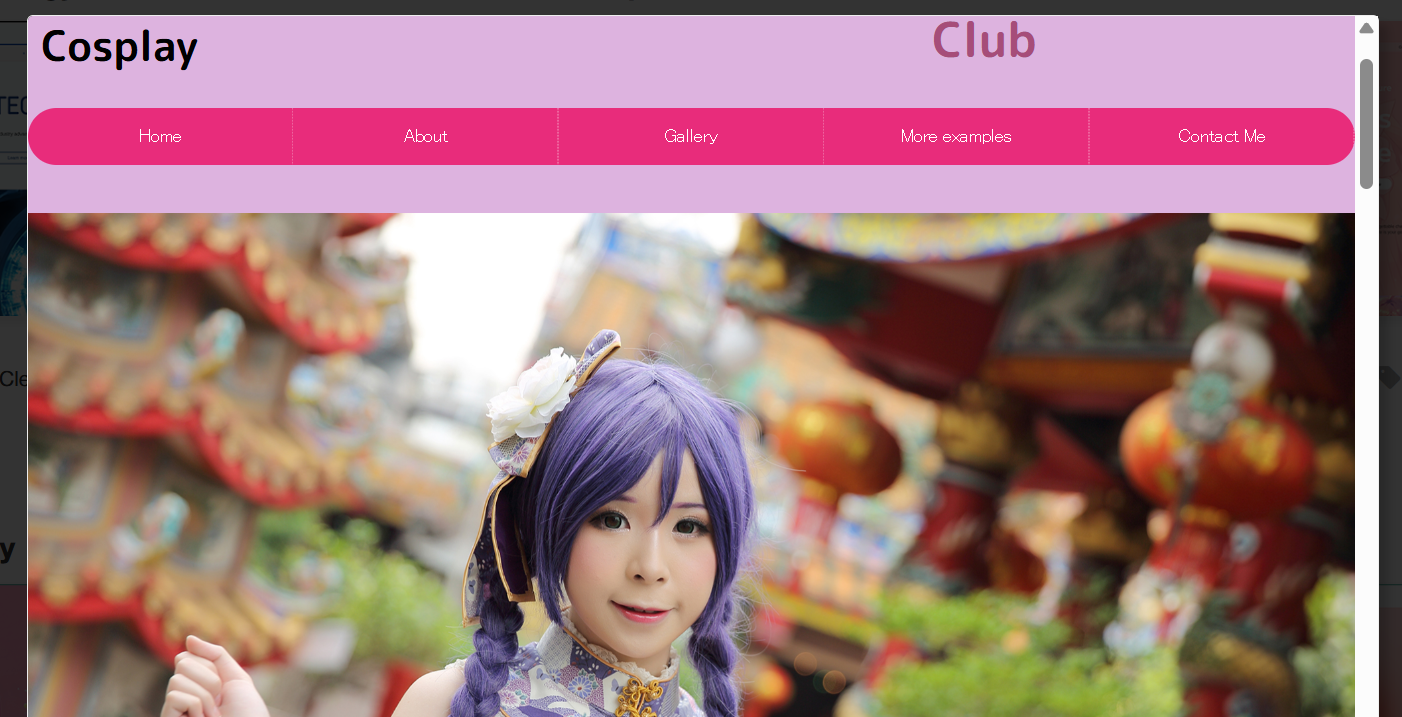
Not all website builders are capable of handling an image-based portfolio site well. Here's what to look for:
Powerful gallery & image display system. You need various gallery styles like grid style, slideshow style, and masonry layouts.
Mobile-responsive templates. Your site should look great on phones by default.
Fast image loading. Despite dozens of high-res photos, the site should load fast.
Easy to update. It should be easy to create new galleries and upload pictures without being tech-savvy.
Affordable. Free or very low-cost options work great to get you started.
Custom domain support. Yourname.com looks way more professional.
No coding required. Editing by drag-and-drop, so you can concentrate on content.
WePage's platform fits the bill with templates created for visual portfolios. Photo galleries flow seamlessly, mobile optimization is built in, and you can get a site up in hours without ever touching code.
10. Crafting an About Section That Resonates
Your About page is where you get to tell your story and share who you are with all of those visitors that come to your site:
- ★ Start with your cosplay journey. How did you get into cosplay, and how long have you been doing it?
- ★ Explain your specialties. "I specialize in armor building and weathering," or "I focus on chic ballgowns inspired by fantasy series."
- ★ Mention notable achievements. Awards won, significant conventions visited, and any press or features with you.
- ★ Add a nice picture of yourself looking like yourself, and not in costume. People want to know who they are behind the cosplays.
- ★ Add personality. Write like you're chatting someone up at a con, not applying for a job.
- ★ Keep it a reasonable length. 3-5 paragraphs are plenty.
This way, the About section transforms you from a random cosplayer to someone people sort of know.
11. Handling Photographer Credits Properly
Properly crediting photographers is not only professional courtesy, but it's smart business networking:
Always credit photographers clearly. All photos must have the photographer's info showing.
Include a link to the photographer's social media or sites. Makes the credit actionable.
Ask permission before posting. Even if you are the subject of the photo, the photographer has the copyright.
Respect photographer watermarks. Don't crop them out.
When you promote your site on social, tag photographers. They will probably share, and your reach will grow.
Better photographer relationships mean more photoshoots, better photos, and both of you sharing each other's work.
12. Keeping Your Cosplay Site Updated
A dead portfolio can be worse than no portfolio at all:
- ➔ Set a regular update schedule. Post your new photos within one week after each convention.
- ➔ Batch your updates. Organize all photos from a con or shoot, edit them together, then upload them in one session.
- ➔ Delete or archive dated content. Nobody needs to see your first costume from 8 years ago in the main portfolio.
- ➔ Keep the convention schedule current. Announce next month's cons at least monthly.
- ➔ Share updates on social media. Post whenever you update your site.
Make an effort to meaningfully update your site once a month.
13. FAQ
13-1. What is the best website builder for cosplay portfolios?
WePage works great for cosplay portfolio sites, being that it's made for visuals, with solid gallery options, templates that work on mobile devices, and no coding necessary. There are other options like Wix, Squarespace, or WordPress, but they can be pricier or more technical.
13-2. How many photos should I post per costume?
Add 5-10 good-quality photos per costume that feature different angles, poses, and details. If they're all good, more is fine, but don't pad a gallery with poor work. Quality always beats quantity.
13-3. Do I need a custom domain for my cosplay website?
You can even jump in with a free subdomain like yourname.wepage.com, but your own domain, such as yourname.com is much more professional and easier to remember. A custom domain will cost you $10-15/year, and it's well worth it in the long run if you're serious about your cosplay portfolio site.
13-4. Do I need to have a separate cosplay site from my social media?
Yes, have both. Daily posts and social media are for updates and interaction; your website will be your permanent portfolio. Social posts disappear in the feeds, but your website remains organized and complete. They have different roles and play best together.
13-5. How do I sort costumes of the same character?
Make one gallery for that character and pack all the versions there. Or create separate galleries: "Character Name V1 (2022)" and "Character Name V2 (2024)" if the models change quite a bit. Just do the same thing across your site.
13-6. Can I have a cosplay portfolio website to make money?
Yes, via commissions, paid appearances, selling patterns, links to a Patreon page, affiliate marketing or prints. Opportunities come to you based on the work shown on your portfolio site. Add clear calls to action telling readers how they can book you or support your work.
14. Conclusion
When you break it down to what really matters—gorgeous photos, clear information, and easy ways to get in touch—building a cosplay portfolio site is simple.
Your costumes are amazing, and they should not be getting lost in the murky social media algorithm.
Begin with a powerful image-first layout and simple galleries when you use a cosplay website builder. Include pertinent personal info, what your con schedule is like, and if you are open for commissions. Keep it fresh with new costumes after each con or photoshoot.
Ready to showcase your cosplay properly? Check out WePage's features and see how simple it is to create a visual portfolio that does your costumes justice. With drag-and-drop galleries and mobile-responsive design, you'll have a professional cosplay portfolio site running in hours, not weeks.
SHARE

Related articles


