

SHARE



How to Build a Website for Your Yoga Studio
January 9, 2026 | 25 min read
By WePage Team

Table of Content
- Why You Need A Website For Your Yoga Studio
- Must Have Pages for a Yoga Site
- Selecting the Perfect Yoga Website Template
- Wellness Web Design Principles That Actually Matter
- Photo Tips for Your Yoga Site
- Creating Content That Resonates with Prospective Students
- Writing a Good Class Schedule Section
- Creating Online Booking and Contact Possibilities
- Pricing and How to Display It
- Adding Testimonials and Social Proof
- Mobile Optimization for Yoga Websites
- Making a Blog or Resource Directory
- SEO for Yoga Studios in Summary
- How to Combine Social Media with Your Site
- Building Your Yoga Website with WePage
- What to Do After Your Site Is Launched
- Mistakes That Yoga Teachers Make on Their Websites
- FAQ
- How much does a yoga studio website cost?
- I have Instagram, do I need a website as well?
- What pages should you include on your yoga website?
- How do I take good photos for my yoga website?
- Is it acceptable to include price quotes on my yoga website?
- Can I create my own yoga website even though I'm not techie?
- Summary
You're a boss at teaching yoga, but building a website feels like you're learning an entirely new practice. So, you know you need one, as students are certainly asking, "Do you have a website?" yet not completely sure where to begin or what to populate it with. Here's the truth: A Yoga website doesn't need to be complex or expensive.
It simply needs to share what you teach, what times you are teaching it, and how people can book with you.
Building a website for your yoga studio is about ensuring that potential students can find you, understand the style of your practice, and sign up for classes. You don't need any fancy animations or advanced features.
You want clear information, a reassuring design, and easy ways for people to get in touch or schedule sessions. That's what truly turns website visitors into students on your mat.
1. Why It Is Must To Have A Website For Your Yoga Studio
Social media is fantastic, but it's no longer enough. Instagram posts disappear from feeds. Facebook event pages get buried. You've had a prospective student search "yoga classes near me," or poll friends for recommendations, and, before they even discuss rates, people want to check out your website. No website, so you look unprofessional compared to studios that do have one.
A yoga studio site is your digital home. Everything that matters is there, alive in one place where you can do something about it. Schedules, prices, your way of teaching, what students say about it, and where to reserve.
Now, anyone can find an answer at 2 am without contacting you. That's the luxury of books over classes.
Think about how you look things up for yourself. If someone mentions a yoga teacher, you Google them. If they don't have a website, only an Instagram, you might press on. A website can establish trust and credibility in a way that social media alone simply doesn't. It indicates that you are settled in and committed to your teaching.
When you're building on platforms like WePage, you can have a professional site up in hours instead of weeks. No code, no hiring expensive designers. Simply select a template, input your information, and you're live.
2. Must Have Pages for a Yoga Site
You don't need twenty web pages on your yoga teacher website. It requires good pages with clear information. Here's what actually matters:
- The home page is what many users see first. This should quickly, instantly, tell them who you are, what you teach, and where we can find you. Big headline, such as "Hatha Yoga Classes in Downtown Portland." Plus a picture of you mid-pose teaching. That's your hook.
- The About page is where you share your story. How you discovered yoga, your training, your teaching philosophy. People want to know who is behind what they are learning. Be personal, but not too long. 3-4 paragraphs are plenty. Attach a solid photo of yourself.
- The Classes/Services page shows what you offer. Various class types, private sessions, workshops, and online classes. For each, share what it is, who might want to use or purchase it, and how much it costs. Be specific. "Beginner-friendly Vinyasa flow, Tuesdays 6 pm, $20 drop in" is already way better than a loose description.
- The schedule page displays when the classes are occurring. A plain old calendar or list will suffice. Add times, locations, and class types. Keep this updated so people aren't showing up to canceled classes.
- The pricing page can be standalone or with services. Be transparent about costs. Drop-in, packages of classes, and membership. Hidden pricing frustrates people.
- Contact/Booking page that makes it easy for someone to get a hold of you or sign up. Contact form, email, phone number, and booking link if you use scheduling software. The more seamless you can make this, the more bookings you get.
You can always add blog or testimonials pages later, but these are the basics to start. Simple, complete site beats a fancy, incomplete one.
3. Selecting the Perfect Yoga Website Template

Begin with a yoga website template to save yourself loads of time. You don't have to start from scratch, but can tailor something developed for wellness businesses. Here's what to look for:
- ★ Calming, clean design. Yoga is peace and mindfulness. Your site should feel that way to visitors, too. Plenty of white space, soothing colors, clean layouts. Stay away from busy or chaotic designs.
- ★ Mobile-responsive. That site is mostly how readers will see your work, on phones. The template has to look attractive and function seamlessly on mobile. Test this before committing.
- ★ Easy navigation. Visitors should be able to find class schedules, booking options in two clicks max. Confusing navigation loses potential students.
- ★ Photo-friendly. Yoga is visual. Your template MUST have room for nice photos of you teaching, your studio space, and students practicing (if they've given permission).
- ★ Built-in contact forms. Allows people to message you without having any separate tools.
- ★ Space for class schedules. Some templates even have a built-in schedule section, allowing you to display class times neatly.
- WePage's yoga template is designed for yoga studios and teachers. It comes with all of these features built in. You simply add your content and photos, no design skills required.
If you choose the right template, half the work is done for you. Don't overthink it. Choose something clean that feels like your vibe and continue.
4. Wellness Web Design Principles That Actually Matter
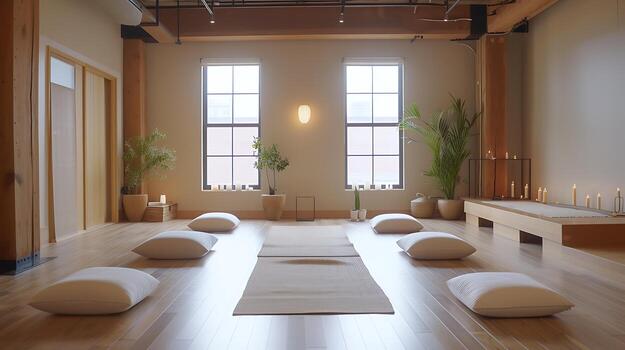
Wellness web design isn't only a looker! It's all about setting a tone consistent with the yoga that you teach. Here's what works:
- ➔ Use calming color palettes. Soft neutrals, earthy tones, muted greens, and blues. These colors inspire the calm vibe many people seek from yoga. Avoid vibrant and aggressive colors that evoke tension.
- ➔ Keep layouts simple and spacious. White space (which is just another name for space) helps you read and gives the feeling of calm. Don't cram everything together. Let it breathe.
- ➔ Choose readable fonts. Script fonts are hard to read. Choose basic fonts for body text. Yes, you can fancy up headlines a little bit, but never assume that style trumps readability.
- ➔ Show real photos, not just stock images. Photos of you teaching a real class or in your studio, if possible, with permission from some students. Stock images of perfect models doing perfect poses look insincere. Authenticity builds trust.
- ➔ Make text scannable. People skim websites. Break it up with brief paragraphs, bullet points, and clear headings. Wall-of-text paragraphs don't get read.
- ➔ Create obvious buttons. "Book a Class" or "Schedule Free Consultation" buttons should stand out. Make them a contrasting color, so they really pop.
- ➔ Keep it professional but warm. You're a professional yoga instructor, yet yoga is personal and inclusive. Balance expertise with approachability in your design and copy.
The aim with wellness web design is for visitors to feel restful and comfortable, as though they already know and trust you before they've even taken your class.
5. Photo Tips for Your Yoga Site
Photos make or break yoga websites. Quality photos of you teaching instantly establish credibility and connection. Here's how to get them without paying expensive photographers:
- Have someone come in to photograph your real classes. Have a friend with a passable phone camera film a class. Real shots of you teaching, making adjustments with students, and showing poses. These are more valuable than any staged photo shoot.
- Use natural lighting. Morning or early evening light looks WAY better than harsh overhead lights. Make an appointment to shoot when your studio boasts good natural light.
- Show variety. Different poses, different angles, close-up photos, and wide shots. Have some variety rather than the same old look.
- Include your face. Students want to see who's teaching them. Don't hide behind artistic shots. Appear at ease, smiling, connecting with students.
- Photograph your space. Wide shots of your studio, a lobby area, any special features. People want to know where it is they are going to be practicing.
- Get permission for student photos. If you are using photos of students, obtain written permission. Others do not want their image on the internet. Respect that.
- Edit for consistency. Simple retouching to lighten, crop correctly, and match the color of photographs. You don't need Photoshop skills. Phone apps work fine.
- Avoid over-posed perfection. The shot of some perfect-looking handstand with the life sucked out of it by ideal lighting looks amazing, but feels distant. There's something more welcoming about seeing actual people in actual moments of practicing.
You don't need professional photography yet. A phone photo is better than no photo. You can always upgrade later, as your business grows.
6. Creating Content that Resonates with Prospective Students
The written content on your yoga studio website is just as important as design. Here's how to write content that books classes:
- ★ Talk human, not brochure. Write just as if you were explaining things to a friend. Warm, clear, genuine. Steer clear of being too corporate or spiritual in a way that sounds lofty.
- ★ Address student concerns directly. Novices fear they aren't flexible enough or that they will look foolish. Address this: "Never done yoga? Perfect. Most of my students were once where you are."
- ★ Explain your teaching style clearly. Don't just say "I teach Vinyasa." Say "I instruct Vinyasa flow with emphasis on breath work and modifications for varying levels. Classes are challenging but never overwhelming."
- ★ Opt for particulars rather than generalities. Rather than "transformative yoga experience," say "you'll leave class feeling energized, stretched out, and mentally clearer."
- ★ Include student testimonials. Actual quotes from actual students about what it's like working with you. These build trust so much better than you bragging about yourself.
- ★ Make pricing clear. Don't make people go digging for costs. Be upfront. "Drop-in: $20, 10-class package: $180, Unlimited monthly: $150."
- ★ Inject personal details into your About page. Share why you love teaching, how you found your way to yoga, perhaps something personal and relevant. Let people see who you are.
- ★ Keep paragraphs short. 2-4 sentences per paragraph. People don't read long blocks of text on screens.
Write like you're speaking to the questions a prospective student has asked you in person. That tone works perfectly for yoga site ideas and content.
7. Writing a Good Class Schedule Section
Your class schedule is the heart of your website. Folks need to know when they can come. Here's a way to make it clear:
Use a simple format. A simple table or list with the day, time, class type, location and teacher (if you have multiple). Don't overcomplicate it.
Example:
- ● Monday 6 am - Morning Vinyasa - Main Studio - Sarah
- ● Monday 9 am - Gentle Yoga - Main Studio - Sarah
- ● Monday 6 pm - Power Flow - Main Studio - Sarah
- ➔ Update it regularly. There are few things more irritating to students than coming when class was canceled. Keep your schedule current.
- ➔ Note class levels. Label them as Beginner-Friendly, All Levels, or Intermediate/Advanced. It allows people to choose the right classes.
- ➔ Include class descriptions. Small note on what each class type means. Newcomers have no idea what the difference between your Vinyasa and Hatha classes is.
- ➔ Booking link. If people can book online, place a "Book This Class" button beside each class. Remove friction.
- ➔ Show cancellations clearly. Label canceled classes distinctively. You can also offer email notifications if you have a mailing list.
- ➔ Mobile-friendly formatting. Many people look up schedules on phones. Ensure your schedule is easy to read on a small screen.
Some website builders have calendar integrations so they will sync with Google Calendar or booking software. If you work with schedules that are updated often, this is a time-saver.
8. Creating Online Booking and Contact Possibilities

The easier you make it for people to book classes, the more students you get. Here's what works:
- Incorporate any booking software you may use. Through services such as Mindbody, Schedulicity, or Acuity, you can embed booking directly on your website. Customers reserve straight from your site.
- If you aren't using booking software, use a contact form. Basic name, email, phone form asking which class they're interested in. You do it manually until you're ready to automate booking.
- Make your contact form visible on your website. "Contact" or "Book Now" in your main navigation. Don't bury it three clicks deep.
- Include multiple contact methods. Email, phone, contact form. Some people like to call, others want to email. Give options.
- Set expectations for response time. "I typically respond within 24 hours" or "I'll text to confirm within a few hours." This limits the concern about whether you received their message.
- Add your location clearly. Full address, map embed when you can. Provide people with a clear way to find your physical studio.
- List your teaching areas. If you teach at more than one studio or have virtual classes, make that especially clear. "Classes in person at Downtown Yoga Studio and online through Zoom."
- Create an FAQ section. Answer FAQs: What to bring, what to wear, where to park, and the late policy. This reduces back-and-forth messages.
The easier you make the booking process, the more people will book rather than planning to do so and forgetting about it.
9. Pricing and How to Display It
Being clear about yoga class prices on your website can lead to more bookings from students. Here's how to approach it:
- Be upfront with costs. Hidden pricing looks sketchy. Before they contact you, people want to know whether or not they can afford you.
- Offer multiple options. Single class drop-in, multi-class packs, and monthly unlimited. Different students want different commitments.
- Explain the value of packages. Show the per-class savings. "10-class package: $150 ($15 a class, save $5 per class over drop-in)." Make the value obvious.
- Include intro offers. Your first class is free or deeply discounted. This reduces the barrier to entry for new students experimenting with you.
- Mention payment methods accepted. Cash, cards, Venmo, whatever you accept. Eliminates questions.
- Keep the pricing page updated. If prices change, update your website right away. Touting old prices and charging various amounts annoys people.
- Consider community/student pricing. If you give discounts to students, seniors, or members of the community, let them know.
- Private sessions are separate. Create a separate listing for private or semi-private session rates from group classes.These are different price points.
Some yoga teachers are fearful that listing prices will scare people away. Reality is the opposite. When there are no prices listed, people think you're expensive and won't ask.
10. Adding Testimonials and Social Proof
The experience of other people is considerably more trusted than your marketing, here’s how to make good use of testimonials:
Ask satisfied students for testimonials. After someone's been coming regularly and is seeing good results, ask if they'd be willing to share some words about what the experience has been like for them. Most everyone will be happy to help.
- Get specific testimonials. "Sarah's classes are amazing!" is nice but vague. "I began Sarah's beginner classes 6 months ago with no flexibility at all. And now I can touch my toes, and my back pain is gone!" is way more powerful.
- Include photos if possible. Testimonial with photo of student (with permission) just "feels" more real than text alone.
- Display prominently. Feature your top 3-4 testimonials on your homepage. Then make a testimonials page for more.
- Show results and transformations. If students experience physical and mental health benefits from your classes, those stories can really sell. (Always with permission.)
- Include links to reviews on Google or Yelp. If you have good reviews there, link to those. This adds credibility.
- Don't fake testimonials. It's obvious and destroys trust. Use feedback only from real students.
- Keep them updated. Insert new testimonials as you receive them. New social proof is better than 5-year-old testimonials.
Social proof is the single most powerful way to turn website visitors into paying students. Use it
11. Mobile Optimization for Yoga Websites

More than 60 percent of those looking for yoga classes do so on their phones. You're losing students if your website doesn't perform on mobile. Here's what matters:
- ➔ Responsive design is non-negotiable. Your website should automatically fit the screen on phones. Current templates, such as WePage's options, are designed to do so automatically.
- ➔ Test on actual phones. Don't just resize your browser. Try out your site on real phones (iPhone, Android). What looks OK on desktop can fall apart on mobile.
- ➔ Make buttons finger-friendly. Phone screens are small. Buttons also need to be large enough that you can tap them without risk of hitting something unintended.
- ➔ Keep navigation simple on mobile. Seven-level dropdown menus are annoying on phones. Stick to clear, simple navigation.
- ➔ Load speed is more important on mobile. Sites that load slowly on phones bounce instantly. Optimize images, avoid unnecessary widgets.
- ➔ Phone numbers should be clickable. Phone numbers on mobile should open the phone dialer immediately when tapped. Makes it easy to call you.
- ➔ The schedule should display easily on small screens. Tables that look great on desktops can often break on phones. Use mobile-friendly formatting.
Most bookings are done from phones now. Someone sees your Instagram post at lunchtime, Googles you, checks your schedule on their phone, and books in for a class. Make that process smooth.
12. Making a Blog or Resource Directory
A blog is not obligatory, but it assists in SEO and establishes you as an expert. Here's how to approach it:
- Start simple. One article per month is better than scheduling ambitious weekly articles and burning out.
- Write about things your students actually ask for. "How to Start a Home Yoga Practice," or "What to Expect in Your First Yoga Class," or "Yoga for Back Pain Relief."
- Keep posts practical and helpful. Don't write just to write. Offer genuine value that your ideal students will desire.
- In some of your posts, include where you are. "Best Yoga Props to Buy in Portland" or "Outdoor Yoga Spots in Austin." This helps with local SEO.
- Add photos and videos. Text-only blog posts are boring. You can break them up with images, perhaps showing poses with photos or short videos.
- Link back to your services. Natural closer at the end: "Looking to perfect these poses in real life? Check out my schedule here."
- Make it easy to read. Short paragraphs, bullet points, and clear headings. People skim.
- Share blog posts on social networks. Every blog post is content you can share to Instagram, Facebook, etc., pulling people back to your website.
You don't have to be a full-time blogger. Even 6-12 useful blog posts per year make your site look active and boost Google search rankings.
13. SEO for Yoga Studios in Summary
SEO (search engine optimization) is how people who Google "yoga classes [your city]" find your website. Here are the basics that actually work:
Include your location everywhere. Your home page title might look something like "Vinyasa Yoga Classes in Downtown Seattle, Studio Name." Include your city/neighborhood in a minimum of one spot around the site.
Use relevant keywords naturally. "Yoga classes," "beginner yoga," "private yoga instruction"—whatever you offer. No stuffing of keywords in awkward places, just use them where appropriate.
Fill out meta descriptions. These are the little descriptions that appear in Google search results. Most website builders provide a simple field to input them.
Add alt text to images. Describes what's in each photo. Aids Google in understanding your images and aids the visually impaired.
Create a Google Business Profile. Free listing that gets you found on Google Maps and local search. Essential for local businesses.
Get reviews on Google. Get students to review you on Google. These work wonders for your local SEO.
Keep your website updated. Adding something new to your site regularly (like writing blog posts) shows Google your page is active.
Ensure your website loads quickly. Slow sites rank lower. Compress images, avoid excessive plugins.
SEO is a long game, but it pays off. It's free traffic from people who are actively searching for what you provide.
14. How to Combine Social Media with Your Site
Your website and social media should complement, not compete with one another. Here's how:
- ★ Use social media icons on your site. Link to your Instagram, Facebook, or YouTube profile—whatever it is you actually use. Stick those in your header or footer.
- ★ Embed your Instagram feed. Many templates enable you to showcase your most recent Instagram posts on your website. Shows you're active.
- ★ Share website content on social. Each time you change your schedule, add a new class, or write a blog post, share it on social media with a link back to your site.
- ★ Use social proof. Insert Facebook reviews or Instagram comments (with permission) as testimonials.
- ★ Include your website in all social bios. Instagram bio, Facebook page info, TikTok bio—everywhere. Ensure it's easy for your social followers to discover your entire website.
- ★ Promote special offers. "New student special: 1st class free! More info and bookings at my website [link]." Bring social traffic to your site.
- ★ Keep branding consistent. Carry forward the same colors, photos, and message tone throughout your website and social networks. This creates a cohesive brand.
Your site is your home base. Social media brings people there. Now that they're on your site, it's where you convert them to a paying student with clear info and easy booking!
15. Building Your Yoga Website with WePage
When you choose the right platform, building a website for yoga teachers doesn't have to take technical know-how or a big budget. Here's why WePage excels for yoga teachers:
Templates designed for wellness businesses. You're not starting from a generic template and making do. The yoga template is ready-to-go with sections and layout.
No coding required. Drag and drop editor: a way for you to add content by clicking and typing. No need to learn code or hire a developer.
Mobile-responsive automatically. There's no extra work to make your site look good on phones. This is built in.
Fast loading speeds. It's optimized for speed, and speed is crucial to the user experience as well as SEO.
Easy to update. Class schedules can be updated, pricing can be changed, and photos added by you on your own schedule. No waiting for a web developer to make minor tweaks.
Affordable pricing. Way less expensive than paying someone to create a custom site. Free to start; paid plans for a custom domain and additional features.
Built-in SEO tools. Meta descriptions, alt text, and clean URLs. The technical SEO work is done.
Instead of weeks or thousands of dollars, you can have a professional, full-blown yoga studio website up in hours. Concentrate on teaching yoga, not wrestling with website code.
16. What to Do After Your Site Is Launched
Launching your website is only the beginning. Here's what you should do post-launch:
- Share it everywhere. Social media post, email signature, mention during class. Get the word out.
- Monitor Google Analytics. Learn how many people are visiting, what pages they view, and where they're coming from. This data helps you improve.
- Ask for feedback. Share the site with a few reliable students and see if anything puzzles or confuses them.
- Keep it updated. Update class schedules, occasionally add new photos, and blog posts if you have time.
- Test booking process. Take yourself through the process of booking a class. Make sure it works smoothly.
- Add new testimonials. Continue to add the testimonials of other students who share their feedback on your site.
- Improve based on data. If everyone is bouncing off your pricing page, perhaps your pricing isn't clear. If no one is clicking your booking button, perhaps it isn't visible enough.
- Promote special offers. Advertise workshops, challenges and special events on your website. Keep content fresh.
Your website is never really "finished." It's a living tool that evolves with your business. But don't allow perfection paralysis to keep you from launching. Set it up well enough, release it, and iterate.
17. Mistakes That Yoga Teachers Make on Their Websites
Making it too complicated. You don't need every feature. Begin simply with core pages and clear information.
Using only stock photos. Authentic photos of you teaching go a long way to building trust. Stock photos that everyone has seen aren't nearly as effective.
Hiding pricing. Transparency builds trust. List your prices clearly.
Not mobile-testing. Thinking your site is mobile-friendly without verifying. Always test on actual phones.
Forgetting contact information. Visitors need easy ways to reach you. Don't hide phone numbers, emails or booking options.
Overwhelming with spiritual jargon. Not everyone is fluent in yoga philosophy. Write in everyday language that most people will understand.
Never updating it. Launching a website and then abandoning it. Prospective students are frustrated by outdated schedules and old information.
Not connecting with social media. Website and social media should be connected. Link between them.
Skipping SEO basics. If you don't include location or targeted keywords, no one can find your studio in searches on Google.
Most of these are relatively easy to address once you realize they exist. The worst possible thing you can do is not have a website simply because you are overthinking it.
18. FAQ
18-1. How much does a yoga studio website cost?
You can get started for free on a platform like WePage, and upgrade to paid plans of $10-30/month for a custom domain and additional features. This is way more affordable than hiring a web designer ($1,000-5,000+ on average). The big investment here is the time to set things up, which will take two or three hours even if you have a template.
18-2. I have Instagram, do I need a website as well?
Yes. Instagram is good for visibility, but a website makes you look professional and gives you somewhere to add detailed information. People want a normal website when they research you. Instagram by itself makes you look like an amateur, not a legit teacher. And you own your website, but Instagram could change or go away.
18-3. What pages should you include on your yoga website?
You should at least have the following pages: Home, About, Classes/Services, Schedule, Pricing, and Contact/Booking. You may add Blog, Testimonials, or Resources later on, but begin with these essential pages. That's enough to turn visitors into students.
18-4. How do I take good photos for my yoga website?
Ask a friend or student with a good phone camera to shoot your real classes. Real photos of you teaching beat expensive staged photo shoots. Maximize natural light, show variety in poses and angles, and be sure to include your face so people can connect with you. Always obtain permission to use student photographs.
18-5. Is it acceptable to include price quotes on my yoga website?
Yes, definitely. Hiding prices will make people believe that you're expensive, and then they won't even contact you. Being transparent about how much you cost will help you book more students because people know what to expect. Clearly list the drop-in rates, packages, and if there are any, memberships available.
18-6. Can I create my own yoga website even though I'm not techie?
Absolutely. Platforms such as WePage are meant to be used by non-coders. You take a yoga website template, drag-and-drop in some content, and voilà. No coding needed. If you can use Instagram and Facebook, you can build a website. The template handles all that organization and design heavy lifting for you.
19. Summary
Creating a website for your yoga class should not be scary or cost a fortune. With a yoga website template and focused copy that lets students know details about your classes, pricing, and how you teach, you'll be looking like a pro who books more students. Concentrate on making it simple for people to understand what you offer and how to sign up.
Begin with key pages, feature real photos, be upfront about pricing, and keep booking straightforward. Later, as your business grows, you can add more features. The key is getting a good-enough website live so that when someone on Google looks for somewhere to practice yoga nearby, they can find you and understand why they should practice with you.
Ready to build your yoga studio website? Check out WePage's yoga template, specifically created for yoga teachers and wellness enthusiasts. With drag-and-drop editing and mobile-responsive design, you can quickly create a professional website in just hours instead of weeks.
SHARE
Related articles


