

SHARE



WePage Template Spotlight: "Tokyo Pop" Anime-Inspired Design
January 9, 2026 | 13 min read
By WePage Team

Table of Content
- What is the Tokyo Pop Template?
- Who Should Use Tokyo Pop?
- Key Features of the Tokyo Pop Design
- How to Customize Your Tokyo Pop Site
- Layout Tips for Maximum Impact
- Best Uses for the Tokyo Pop Template
- Getting Started with WePage
- Why WePage for Your Anime Website Template?
- FAQs
- How is Tokyo Pop unique among other anime website themes?
- What about Tokyo Pop if I'm not an artist or blogger?
- Do I have to know code to change the Tokyo Pop theme?
- Can I switch to another template if I change my mind later?
- What is the price for using a Tokyo Pop template?
- Will my Tokyo Pop site be mobile compatible?
If you are a fan of anime, manga, or everything related to Japanese pop culture, take a look at the Tokyo Pop website theme from WePage, which will capture your spirit in its design and style. Use this fun anime website template. Ever wish you could bring the excitement of J-culture and your love for manga to your online home base without having to worry about doing any coding?
Whether you're a cosplay artist presenting your work, a blogger writing about new anime arrivals, or someone selling merchandise inspired by manga, Tokyo Pop will give you an engaging site builder that’s dedicated to the job at hand, rather than yet another WordPress clone.
1. What is the Tokyo Pop Template?
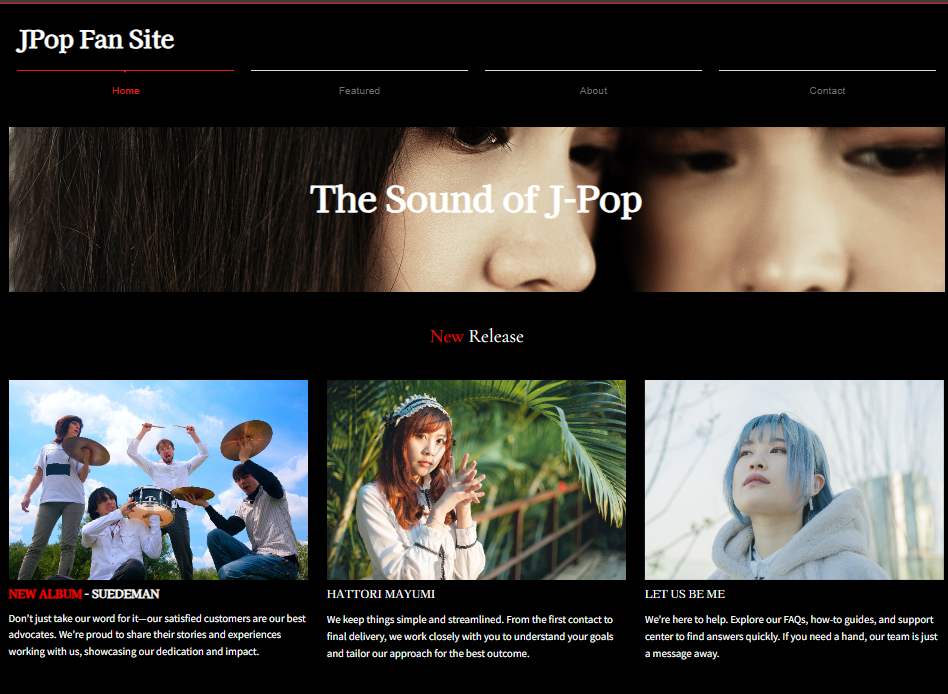
Tokyo Pop is a pre-designed WePage template inspired by the vibrancy and energy of Japanese pop art culture. Think vibrant pinks, electric blues, loud typography, and layouts that are like walking through Harajuku on a Saturday afternoon.
Instead of boring, vanilla corporate templates, this design is something you’ll actually be proud to put online.
"Tokyo Pop is not just a template. It's a manifesto. It's a little sign that tells visitors like us that you're all about creativity and don't care about conforming."
The template is plug-and-play. It's ready to use straight after download. You select it from WePage's template library, you add your content, change the colors if you like, and voilà! No struggling with code or hiring pricey designers.
2. Who Should Use Tokyo Pop?
This style of Japanese website design works best for:
- Content Creators & Bloggers Whether you cover Japanese anime and manga, are attracted to Japan's rock/pop scene with its independent idols and a rhythmic parade of school girls participating in cosplay dance events, Tokyo Pop takes on the mantle that best reflects your energy.
- Cosplay Artists & Performers Show the world your amazing work, whether it was a costume made for yourself or someone took some fantastic character photos of you, with an artistic and playful portfolio presentation. The gallery layouts of Tokyo Pop were created for pictures.
- Artists & Illustrators Whether you illustrate in a manga style, create digital art, or design anime merchandise, get your work front and center using layouts that let your art speak for itself.
- Small Business Anime Vendors Selling Japanese goods or perhaps running a themed cafe? The other recommended release in this category is Tokyo Pop, which helps your online store or business site feel true to the culture you're paying homage to.
- Event Planners Organizing anime conventions, costume play gatherings, or any cultural events? This theme makes sharing schedules, guest bios, and ticket information incredibly easy in an attractive manner.
The common thread? You love Japanese pop culture.
3. Key Features of the Tokyo Pop Design
What is special about this anime website template over the rest? Several design elements combine to achieve that unmistakable Tokyo Pop aesthetic:
- Bold, Saturated Colors The default palette involves bright colors: hot pinks, electric blues, sunny yellows. These are not dull corporate colors; they are the vivid tones you find in anime title cards and on manga covers. They are customizable by way of WePage's customization tools, however. Defaults look good, though.
- Dynamic Typography Font choices matter. By the way, Tokyo Pop makes use of whimsical, heavily stylized typefaces for headers that command attention without sacrificing legibility. The body text remains clean and legible, so that your actual content isn't lost in the design.
- Image-Forward Layouts Japanese web design generally is very graphic-driven, so it's appropriate that Tokyo Pop would be as well. With large image blocks, gallery grids, and a space for featured content, you can display your images however you want without making them feel crammed or chaotic.
- Mobile-Ready Over 60% of the traffic comes from phones. Tokyo Pop is 100% responsive. It will look great on any screen size, no extra work required. Your cool site-builder experience carries over when someone drops by on a laptop or scrolls their phone on the train.
- Fast Load Times Bright, busy designs can slow other sites down, but WePage avoids unnecessary reloading so pages feel fast and responsive.
- Flexible Section Blocks. The template is made of sections that you can move to different locations or remove. Prefer to see your gallery before a blog feed? Move it. Need three body text sections instead of two? Add another block. This flexibility is important when you're making something original.
4. How to Customize Your Tokyo Pop Site

One of the really good things about this anime blog template is how simple WePage makes changing it, even if you've never created a website before.
Getting Started When you sign up for WePage, navigate to the template library and choose Tokyo Pop. You'll end up in the editor, where you can see the full template layout.
Changing colors is simple. Click an element and adjust it.
Swapping Images: Placeholder images are used in the design. Swap these out with your own images, art, or virtual design by clicking on the image and uploading your file. WePage also optimizes images for web viewing, so that they look crisp and stunning without sacrificing performance on your site.
Editing Text Content: Simply click and type in any text block. Change fonts, resize text, bold or italicize it. Basic formatting is intuitive. Type your artist bio, blog posts, product descriptions or upcoming event details straight into the editor.
This drag-and-drop experience is what makes WePage a colorful site builder by any standard.
Adding New Pages: Your site is not just one page. Create an about page, gallery, blog, or shop complete with a contact form, right from the page manager. Every page can use the same Tokyo Pop elements, but be appropriate for a different purpose.
That's the advice of Silas Vallejo, lead product designer at lookup service UpCounsel, and in keeping with what Smashing Magazine says is a growing trend toward bold, personality-filled designs as people move away from the cold minimalism that has been all the rage for years. Tokyo Pop certainly finds a place in that continuum.
5. Layout Tips for Maximum Impact
You've got an awesome creative portfolio template; now put it to use. Here's how to Tokyo Pop your way through even more of your goals:
- ★ Start with Your Best Visual Content. That banner in the upper section? Don't squander it on staid stock photos. Choose your most attention-grabbing piece of art, a favorite cosplay photo, or an image packed with energy that instantly communicates who you are to anyone visiting. You have three seconds to grab attention. Take it.
- ★ Establish Visual Hierarchy. You don't want everything to scream for attention at the same time. Utilize Tokyo Pop's main-color blocks to lead the eye. Crucial material goes in high-contrast segments and supporting information in softer ones. Picture your layout as you would a page from a manga. There's a reading flow, not just panels haphazardly strewn.
- ★ Balance Text and Images. Japanese web design tends to be rich in white space, but also contains areas packed with visual text. Don't cram every pixel full. Let your images breathe. Use pull quotes or a small graphic to break up chunks of long text.
- ★ Optimize Your Gallery. If you're sharing pictures of art or cosplay, split galleries by project or theme instead of dumping everything into one endless scroll. Make gallery pages for "Convention Cosplays," "Original Character Designs," and "Commission Work." This has the effect of helping visitors find what they like.
- ★ Keep Navigation Clear. Sometimes a vibrant, busy look can push navigation out of the spotlight if you're not careful. Try to keep your menu simple and always in sight. Go specific instead of general: "Portfolio," not "Work"; "Commission Info," not "Services."
Add Personality to Your About Page. This is also part of what the anime blog template does best. Tokyo Pop's About page layouts are a great way for your story to shine with personality. Incorporate photos of yourself, screenshots of work-in-progress art, and convention badges. Make it human, not corporate.
"Look at your website as if it's really an extension of yourself and not a template that 50 other people are using similarly."
Use Call-to-Action Buttons. Whether you want folks to follow your social media, buy your art, read a blog post, or get in touch with you about commissions, make those calls to action prominently displayed opportunities to act. Tokyo Pop's button styles are compelling by default. Use them wisely.
6. Best Uses for the Tokyo Pop Template
Here's how various creators can take full advantage of this manga artist website design template:
Cosplay Portfolio Sites: Make dedicated pages for every significant character or series you have cosplayed. Add photos of the build process, final images, and convention appearances. The cosplay portfolio site layout on Tokyo Pop does before/after very nicely. Include a "Book Me" section if you do guest appearances or judging.
For Anime Review Blogs, create a format for your blog that has posts that review every series, episode, or movie. Tokyo Pop's bright site builder makes it a cinch to put up featured images, embed video, and feature your star ratings. Have genre category pages like shonen, shoujo, isekai, and slice-of-life.
For Digital Art Portfolios, your original characters, fan art, and commission work in one place! Tokyo Pop uses its grid layouts for thumbnails that can be clicked and expanded. Include a commission information page that lists your pricing, turnaround time, and terms. Share your WePage blog for process breakdowns and art tips.
For online shops that sell anime-themed goods, prints, or handmade items: Tokyo Pop is also a storefront. Showcase your best products on the home page, include category pages, and be obvious with your checkout process.. While WePage takes care of the design of your site, you can also install payment systems for real transactions.
For Convention Information Sites: Are you planning an anime convention or meet-up? Post schedules, guest news, fan art, or anything related to Tokyo Pop here! Its structure is fully adapted for events, so its participants are able to locate the required information within seconds.
7. Getting Started with WePage
Are you all ready to launch your anime website template site? Here's the straightforward process:
- Step 1: Sign Up. Go to the WePage sign-up page and set up your free account. All you need is an email address. No credit card is needed to get going.
- Step 2: Select Tokyo Pop. Look through the template library for Tokyo Pop and select it. Before you commit, you'll see a preview of what it looks like. Hit "Use This Template," and it will load into your editor.
- Step 3: Personalize Your Content. Update text and images with your own copy. Write your About page, upload your best work to galleries, and add blog posts if you plan to use one. There’s no rush—you can save drafts and return to them at any time.
- Step 4: Preview and Test. Preview your site on various screen sizes before publishing. Click through once on every page in the document, check all of your links, and make sure images appear correctly. With WePage's preview feature, you see precisely what your visitors will see.
- Step 5: Publish. Hit publish, and your site is live. You will be awarded a free WePage subdomain (yourname.wepage.site). Get your own custom domain like yourname.com? See WePage's plans for premium features offering custom domains, removal of WePage branding, and analytics.
Website builders now account for over 43% of all websites, and ease of use is the number one reason people choose them over traditional web development, according to W3Techs.
- What About Support? If you face problems, WePage has a contact form available for support. The platform is user-friendly, but actual humans are there if you need help.
- Free vs. Paid Plans: You can use Tokyo Pop and create a full site on WePage's free plan. The free plan is supported by a WePage subdomain and ads. Paid plans ($10 to $30 a month) get rid of the ads, add your own domain, analytics, and priority support. Begin free, upgrade when you're ready.
8. Why WePage for Your Anime Website Template?
WePage might not have been established in the US as long as Wix or Squarespace, but it offers something different: Japanese design sensibility built into the platform. The company gets visual culture, as demonstrated by templates like Tokyo Pop.
The platform is designed for creators who value design but don't want to learn web development. With the drag-and-drop editor, pre-designed blocks, and instant previews, you are able to focus on your content rather than feeling like you’re writing code.
Plus, WePage's pricing stays reasonable. Competitors often charge $20 to $40/month for the same thing. WePage remains affordable while offering only the stuff you actually need.
"The best website builder is the one you're going to use. If the interface makes sense and the result looks like you thought, that's success."
For anime fanboys, manga artists, cosplayers, and J-culture enthusiasts, Tokyo Pop has your measure. It's not trying to be corporate or minimal or that kind of trendy in the wrong sense. It's colorful, expressive, and fun. Just as a website should be.
9. FAQs
9-1. How is Tokyo Pop unique among other anime website themes?
Tokyo Pop's look is heavily inspired by Japanese pop culture styles, not just anime images laid onto a blank template. The colors, typeface, and layout designs are based on real Japanese web design trends. Elsewhere, most "anime templates" are little more than cartoon figures inserted into rudimentary templates.
9-2. What about Tokyo Pop if I'm not an artist or blogger?
Absolutely. The template does wonderfully for creative portfolios and anime circles, but it is flexible enough to cater to small businesses, event planners, or online stores as well as personal sites. If you're looking for colorful websites with personality, Tokyo Pop fits the bill no matter where or how you plan on using it.
9-3. Do I have to know code to change the Tokyo Pop theme?
No coding required. WePage's editor is entirely drag-and-drop. Click any element to edit it. Swap colors, images, add text, change sections. All are using visual tools. If you can use a social network, you can use this colorful site builder.
9-4. Can I switch to another template if I change my mind later?
Yes, WePage allows template switching. Your content (text, images, blog posts) remains the same, but it can look different. You may have to rejigger some layouts (templates are all structured differently), but you won't lose your work.
9-5. What is the price for using a Tokyo Pop template?
The template is free to use on its own. On WePage's free plan, you can create and publish a full site (template + hosting + most basic features). Paid plans ($10 to $30/month) bring custom domains, no ads, analytics, and priority support.
9-6. Will my Tokyo Pop site be mobile compatible?
Yes, the anime blog theme is completely mobile responsive. It automatically optimizes the layout, image dimensions, and text size for smartphones and tablets. You don't have to make a mobile site version by yourself (like others), WePage design will scale to fit on all browser widths.
SHARE
Related articles


